
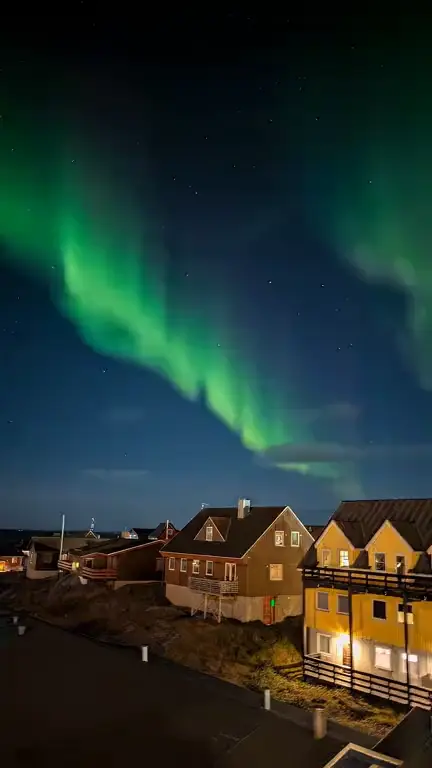
Stars & nebula · 9:16
Cosmic nebula loop template
The cosmic nebula loop template sets the stars and sky in your artwork in motion: points of light twinkle, nebula colors turn slowly and a faint aurora waves, while the ground stays fixed. Load it with the Stars & nebula style already chosen, try the framing on your image, then generate.
Prompt
Stars twinkle at different rates, nebula and night-sky colors swirl very slowly, and a faint aurora ribbon waves across the upper sky. The horizon, buildings, figures and foreground stay completely still. Calm, slow and dreamlike, with no shooting stars and no flashes.
Prompts are written in English because the model follows English instructions most reliably.
Pick this template when your artwork has a sky to work with. Space paintings, astronomy photos, a night landscape under the Milky Way, a figure looking up at the stars, or an abstract cover in deep purples and blues all give the model room to move. The more of the frame is sky, the more visible the effect, which suits the tall 9:16 shape, because the upper half of a vertical Canvas is often sky anyway.
What moves is light and color, at a slow pace. Individual stars brighten and dim out of step with each other, cloudy nebula areas turn and drift, and a soft aurora band ripples across the top of the frame. The instruction keeps the horizon line, buildings and any figure completely still, so the scene feels anchored and the loop reads as a quiet night rather than a moving camera.
It works less well when there is no sky or space in the image. The generator is told not to add new objects, so it will not paint a galaxy into a daytime cover; on such images you mostly get a shimmer. Dense star fields can also lose detail at 720p and after Spotify’s compression, so a few larger stars often look better on a phone than thousands of tiny ones.
Best for
- Ambient, drone and space music
- Dream pop, shoegaze and post-rock
- Sleep, meditation and focus tracks
- Sci-fi and astronomy-themed covers
- Night landscapes and northern lights photos
Tips
- When you frame a square cover with Fill and crop, slide the crop position so more of the sky lands in the 9:16 frame and the horizon sits low.
- Leave out the aurora if your sky has no green or teal in it: replace that part with “no aurora, only stars and nebula” so the colors stay true to your art.
- Use the full 7 seconds in 9:16. Slow swirls need time before anyone notices them.
- For a more energetic track, change “very slowly” to “steadily” rather than asking for shooting stars, which can look like a glitch when the loop restarts.
Uses 1 credit per loop, 720p MP4, no audio
Every upload and result is checked for unsafe content. Real people are animated only with their permission, and nobody is made to talk or sing.